Screen Recorder with Aspect Ratios for Windows

Record once, then format your video for wide, square, and vertical layouts with aspect ratios built for tutorials, product demos, YouTube, and Instagram screen recordings.

Download for Free

Which aspect ratios can I use for screen recording?

Pane Studio gives you screen recording aspect ratios for demos, tutorials, YouTube, and social media without rebuilding the edit.

Core formats

Use wide, square, classic, and vertical aspect ratios

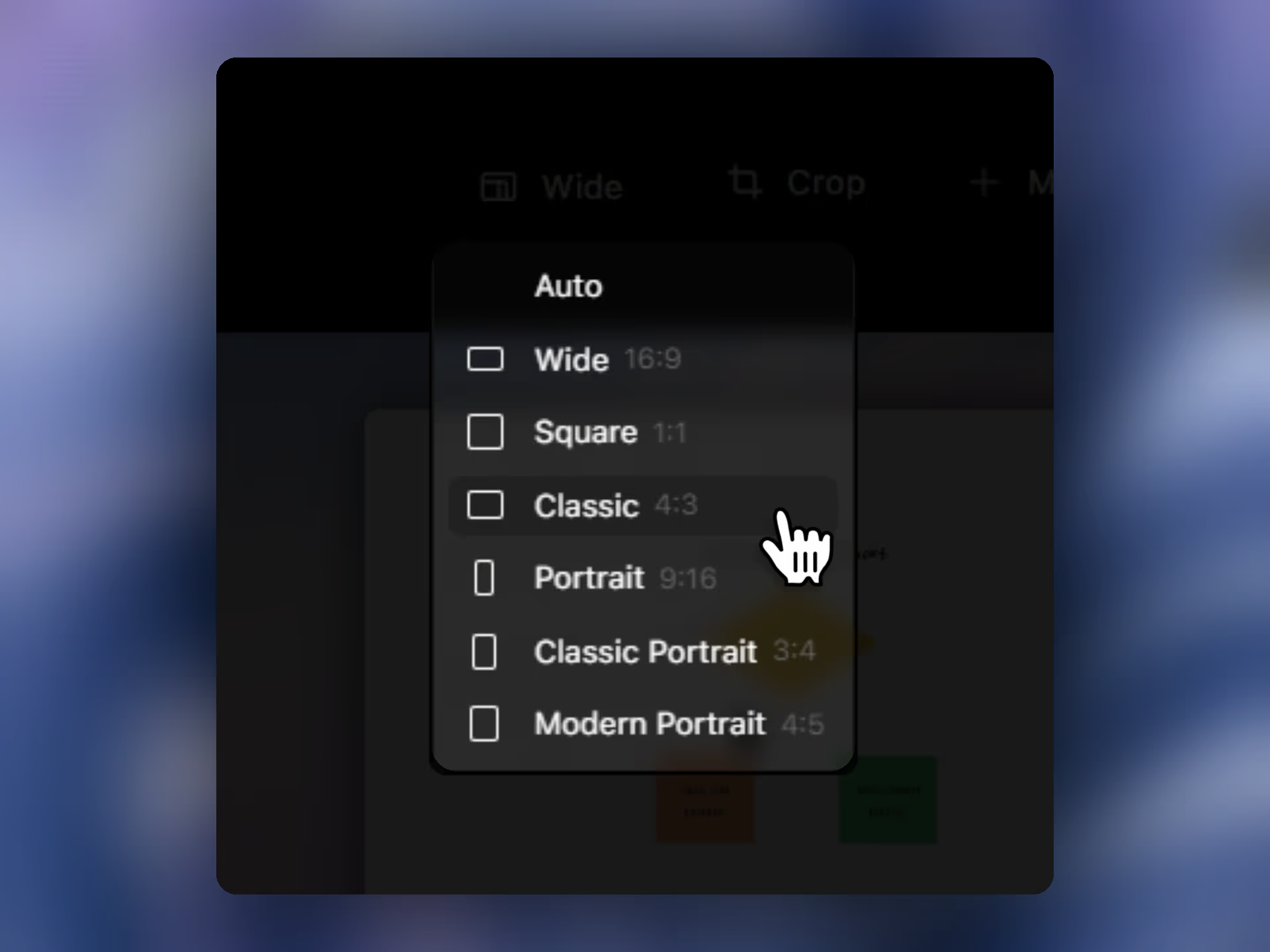
Pane Studio supports wide 16: 9, square 1: 1, classic 4: 3, portrait 9: 16, classic portrait 3: 4, and modern portrait 4: 5. That gives you a screen recorder with aspect ratios for standard desktop videos as well as vertical and square formats used across social media.

After recording

Change the screen recording aspect ratio for the final channel

Record first, then switch the video to wide, square, or portrait depending on the final channel.Classic portrait 3: 4 is useful when you want a taller frame that still feels natural for Instagram - style content.

FAQs

Pane Studio offers wide 16:9, square 1:1, classic 4:3, portrait 9:16, classic portrait 3:4, and modern portrait 4:5 aspect ratios for screen recordings.

Yes. Pane Studio lets you change the aspect ratio after recording, so you can adapt one screen recording for wide, square, or vertical formats without starting over.

Yes. Pane Studio supports vertical screen recording formats including portrait 9:16, classic portrait 3:4, and modern portrait 4:5.

Portrait 9:16 is a strong fit for Instagram Reels and Stories, while modern portrait 4:5 is useful for Instagram feed posts. Classic portrait 3:4 can also work well when you want a taller frame without going fully vertical.

Yes. Pane Studio includes a square 1:1 aspect ratio for screen recordings that need to fit square social formats or tighter embedded layouts.

Wide 16:9 is a common choice for YouTube, demos, and tutorials. Classic 4:3 can feel tighter and more presentation-like. Square 1:1 works well when the recording needs to fit social layouts or compact embeds.

Yes. Pane Studio is useful for social media screen recordings because it supports square and vertical aspect ratios alongside classic wide formats, which makes it easier to adapt the same recording for different channels. If you are also recording with a webcam, custom screen recording layouts help you control how the presenter and screen appear together.

Yes. Pane Studio is a native Windows screen recorder built for Windows 10 and Windows 11.

Start recording beautiful videos on Windows

Download Pane Studio - the native Windows screen recorder for creators, educators, and product teams.

Beta Version