Full control
Fine-tune timing, framing, and cuts without re-recording your screen and camera layout.
Custom layouts for Windows
A Windows screen recorder with custom camera layouts for tutorials, product demos, and course videos.
Record screen and webcam with the right layout
Yes. Pane Studio records your screen and webcam together, then helps you shape the layout so the screen stays readable and the presenter stays visible when it matters.
Fine-tune timing, framing, and cuts without re-recording your screen and camera layout.
Switch between clean screen-and-webcam layouts that keep attention on the right moment.
Blend layout changes with smooth motion so tutorials and demos stay easy to follow.
Create polished picture-in-picture recordings for product demos, courses, and walkthroughs.
Yes. You can adjust layout timing, framing, and balance after the take, which makes it much easier to turn one recording into something polished without starting over.
After recording
You do not need to re-record when the camera feels too large, too small, or in the wrong place. Pane gives you room to change the composition afterward so the final video feels intentional instead of locked to the first take.
Different moments
Some parts of a video should be screen-first. Others work better when the presenter comes forward. Custom layouts help tutorials, walkthroughs, and demos move between those moments more naturally. If your main use case is launches, see create product demos on Windows.
Place and size the screen and webcam yourself when you want direct control over the composition. This works well when the recording needs a very specific balance between the product and the presenter.
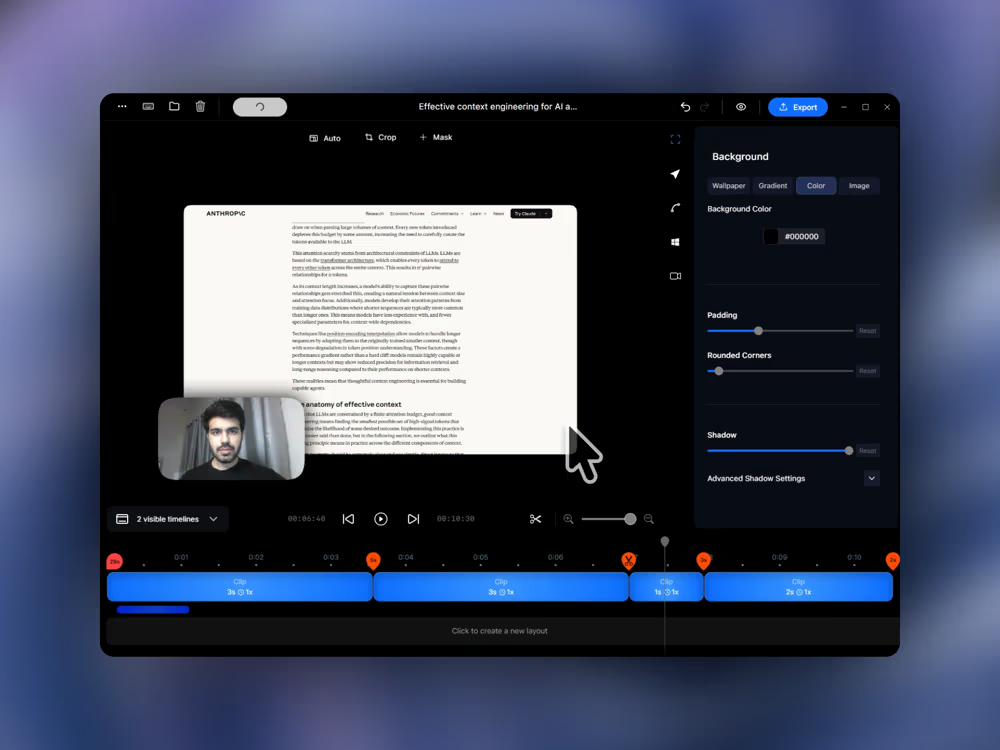
Pane lets you record your screen and webcam together, then switch between layouts that keep the important part of the recording clear. You can show more of your screen when demonstrating a feature, bring the webcam forward when explaining something directly, and keep the overall flow polished without complicated editing.
Custom screen recording layouts arrange your screen and webcam in different ways so the composition can match the moment instead of staying locked to one webcam bubble. That can include picture-in-picture, side-by-side, or more screen-first compositions depending on the video.
Yes. You can fine-tune layout timing, switch between webcam positions, and refine framing after the recording is done. That makes it easier to keep tutorials, demos, and course videos feeling intentional without starting over.
Absolutely. Custom layouts help tutorials and course videos feel easier to follow by balancing screen detail with presenter presence. You can keep the interface readable while still showing your webcam when context or explanation matters.
Yes. Product demos often need both a clean product view and moments where your webcam adds clarity or personality. Custom layouts let you move between those views smoothly so demos look more polished and engaging.
Yes. Pane Studio lets you record your screen and webcam together so you can create tutorials, walkthroughs, demos, and course videos with a more polished layout.
Yes. Pane Studio supports picture-in-picture style screen recordings so your webcam can stay visible without covering the important part of the interface.
Yes. You can create side-by-side layouts when you want the screen and presenter to share attention more evenly. This works well for lessons, walkthroughs, and explanation-heavy videos.
A basic webcam overlay usually stays fixed in one corner for the whole video. A custom layout gives you more intentional framing, better balance between screen and presenter, and more flexibility to adjust the composition for different moments.
Yes. Pane Studio is built for Windows and is designed for creators working on Windows 10 and Windows 11.
Download Pane Studio - the native Windows screen recorder for creators, educators, and product teams.