
Getting started
System requirements
Minimum requirements
To ensure optimal performance when using Pane Studio, your Pc should meet the following specifications:
Operating system:
Windows 10 (19H1) or later (windows 11)
Processor:
Note: Performance requirements may vary based on your recording needs. To ensure stable and high-quality screen recording, your system should meet at least the following requirements:
- CPU: Minimum 4-core processor.
- Graphics: Hardware acceleration is only supported on Intel integrated GPUs for now.
- Storage: SSD recommended for optimal recording performance
Memory:
8GB RAM minimum
Checking your Pc specifications To verify whether your Pc meets the minimum requirements:
- Click the Start button "Windows logo" in the bottom-left corner of your screen
- Click settings button (⚙️ icon).
- Select System and then About
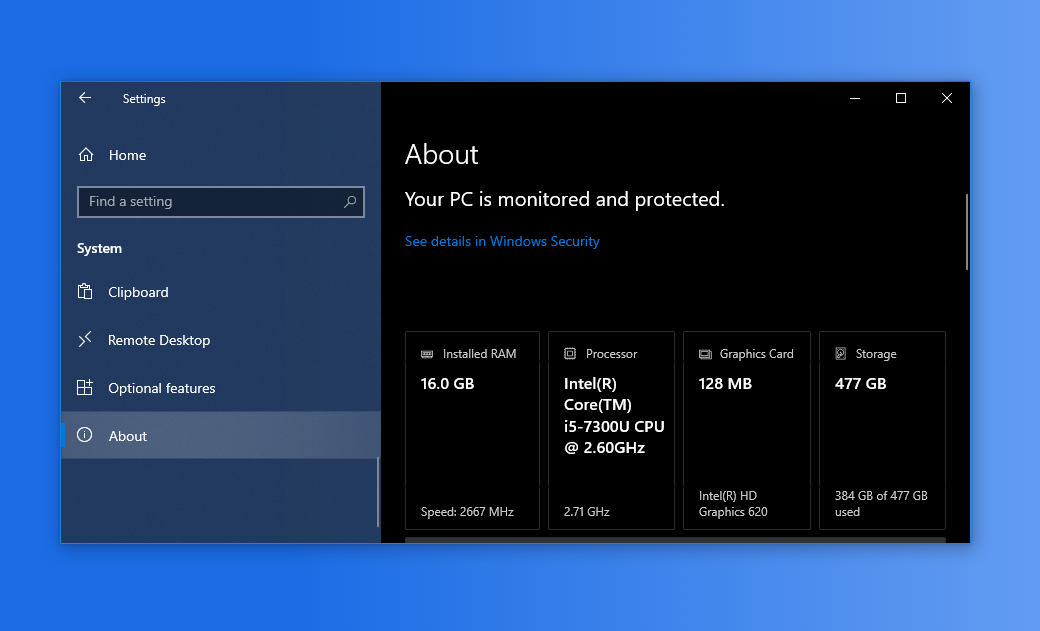
Review the displayed information for:
- Windows version
- Processor.
- Memory (RAM) amount
The panel will show all the specifications you need to compare against the requirements above. If your Pc meets these requirements, you're ready to install and use Pane Studio. If not, consider upgrading your hardware or Windows version for the best experience.